



There appears to be a problem with the JPEG display routines in both Mozilla and Netscape 4 that does not appear to show up when the same image is loaded in gimp, xv, gqview, IE, etc.
I first noticed this problem when browsing my photo album and seeing a lot of pictures with sharp red images showing up as pixelated, even though the original from the camera did not appear to have the same pixelation affect. For examples, see here, here, and here.
Here is the original test image, with no artifacts.
This is in PNG format. The gimp test.xcf.gz is available, too.
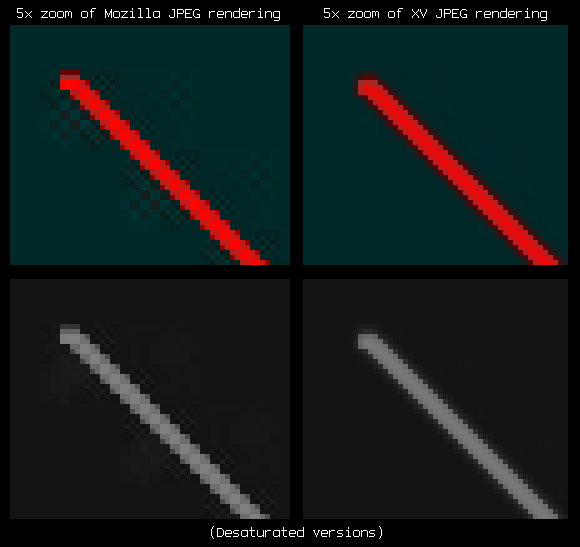
Here is the image saved as JPEG (high quality), loaded in XV, screen captured by GIMP, and saved again as PNG. There is some blurring, but this is to be expected with JPEG:

Now, here is the same JPEG, but displayed in Mozilla (0.9.2+, build ID 2001071308) instead. Note that the red diagonal lines appear to be blocky and have a lot of strange ringing:

Here is a zoomed-in version:
Here is your current browser's rendering of the JPEG:

Here is your current browser's rendering of the JPEG, twice as large: